
Introduction
Custom Layer 4 rules are available to all customers with eligible services. These can be created from the Filtering page at the service level.
Create and verify a rule
Open Services, find your service, and choose Action → Filtering → Add Rules for its protected IP. Under Add New Rule, enable only the match sections you need. In Required, enter a descriptive Name, choose Target Action and Match On, then click Save. Reload and check the rule's name, match, target and ruleset in the saved table.
For the network example below, enable IP List, select Custom Set under Set Type, and enter 192.0.2.0/24 in Custom IP Set. Name it Block example network, select DROP and New Connection, then save. This documentation address must be replaced with the network you intend to block.
On an Anycast service, the TCP verification example enables BPF Match with expression tcp, uses name Verify TCP connections, target TCP Verify, and Match On → All Traffic (Early). The saved target is displayed as SYNPROXY. This example verifies all TCP connections on the selected protected IP; narrow the expression if only particular ports should be affected.
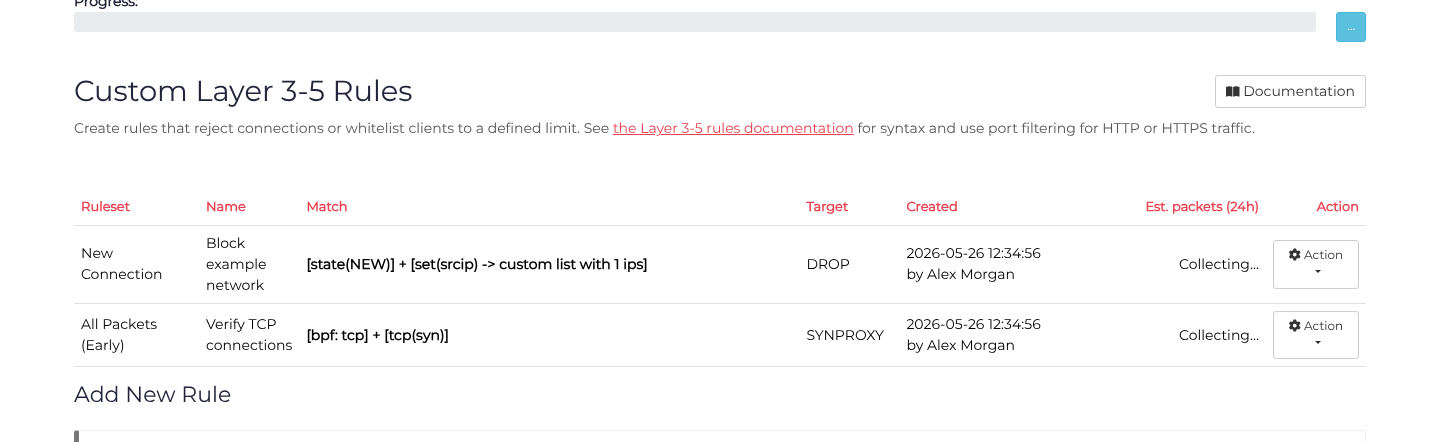
Use a saved rule's Action → Disable to stop applying it temporarily. The rule is shown crossed out after reload. Action → Enable restores it; Delete removes it. Up and Down adjust its order within its ruleset.
What are Layer 4 Rules?
Layer 4 rules operate at the transport layer of network traffic (TCP/UDP), allowing you to filter packets based on IP addresses, port numbers, packet characteristics, and connection properties. Unlike Layer 7 rules which inspect HTTP/HTTPS content, Layer 4 rules work with raw network packets and can be applied to any protocol.
Layer 4 rules are processed before traffic reaches your backend servers, providing efficient protection against attacks and unwanted traffic. These rules are ideal for:
- Blocking specific IP addresses or ranges
- Filtering traffic based on packet patterns using BPF expressions
- Rate limiting connections from specific sources
- Protecting against SYN floods and other network-layer attacks
- Whitelisting trusted networks
For simpler IP-based blocking and allowing, consider using ACL Rules which provide a straightforward whitelist/blacklist mechanism without the advanced matching options of Layer 4 rules.
How Rules Work
Rules are evaluated in the order they appear in your rule list. Each rule consists of:
- Match Conditions - Criteria that identify which packets the rule applies to
- Target Action - What to do with matching packets (e.g. DROP or TCP VERIFY)
- Hook - When to evaluate the rule (New Connection or All Traffic)
When a packet matches all conditions in a rule, the target action is applied. If a packet doesn't match, evaluation continues to the next rule.
Match Options
Match options define the criteria for selecting which packets your rule applies to. You can combine multiple match options in a single rule - all enabled conditions must match for the rule to trigger.
BPF Match Expression
Berkeley Packet Filter (BPF) expressions match packet protocols, ports, sizes, flags, addresses, and bytes. They are evaluated before the rule's other enabled match conditions.
For the expression language, logical operators, parentheses, byte checks, examples, and MicroBPF limitations, see Writing BPF Packet Filters.
Example: tcp dst port 80 matches TCP packets destined for port 80.
IP List
IP lists allow you to match packets from specific source IP addresses or ranges.
Preset Lists:
- Tor Exit Nodes - Automatically maintained list of known Tor network exit points
- VPN & Server Networks - Common VPN providers and datacenter IP ranges
Custom Lists:You can provide your own list of IP addresses or CIDR ranges (one per line). For example:
1.2.3.4
10.0.0.0/24
192.168.1.0/24
Use IPv4 addresses only.
TCP
TCP-specific matching options allow you to filter based on TCP connection characteristics.
TCP MSS (Maximum Segment Size):Match TCP connections based on their Maximum Segment Size value. MSS defines the largest amount of data that can be received in a single TCP segment.
Specify a range (minimum and maximum) to match:
- Lower bound - Minimum MSS value (e.g., 1400)
- Upper bound - Maximum MSS value (e.g., 1460)
Use cases:- Detecting certain types of connections or clients - Identifying tunneled or encapsulated traffic - Filtering based on connection characteristics
Example: MSS between 1400-1460 would match most standard Ethernet connections.
Rate Limit
Rate limiting matches traffic that exceeds (or falls under) a specified rate threshold. This is useful for identifying abnormal traffic patterns or limiting resource consumption.
How it works:You define a maximum rate and burst size. The rule matches when traffic:
- Exceeds the specified rate (useful for detecting floods)
- Is under the specified rate (useful for whitelisting normal traffic)
Rate Units:
- packet/s - Packets per second
- bytes/s - Bytes per second
- kb/s - Kilobytes per second
- mb/s - Megabytes per second
Rate Calculation:Choose what to include in the rate calculation:
- Source IP - Track rate per unique source IP address
- Source Port - Track rate per source port
- Destination Port - Track rate per destination port
Multiple options can be combined. For example, selecting "Source IP" and "Destination Port" tracks the rate of packets from each IP to each destination port separately. Selecting all three options (Source IP + Source Port + Destination Port) is equivalent to tracking per connection.
Burst:The burst value allows temporary spikes above the rate limit. For example, with a rate of 10 packet/s and burst of 20, up to 20 packets can arrive at once, but the sustained rate must stay at or below 10/s.
Example: Rate > 100 packet/s from Source IP would match sources sending more than 100 packets per second.
Region
Restrict the rule to only be evaluated in a specific geographic region. This is useful if you have services deployed in multiple regions and want different filtering rules in each location.
If enabled, select the region where this rule should apply. The rule will only be active on servers in that region.
Match On (Evaluation Hook)
The "Match On" setting determines when your rule is evaluated in the packet processing pipeline. This impacts both performance and what types of traffic can be filtered.
New Connection (Recommended)
The rule is evaluated only when a new connection is established. This is the most efficient option as it processes fewer packets.
When to use:
- Most filtering scenarios
- Blocking IP addresses or ranges
- Rate limiting new connections
- General DDoS protection
Limitations:
- Only sees the initial connection packet(s)
- Cannot match on specific packet types within an established connection
All Traffic
The rule is evaluated on every packet, including those in established connections.
When to use:
- Filtering specific packet types (non-SYN TCP packets)
- Complex BPF expressions that need to inspect individual packets
- Matching on packet characteristics beyond connection establishment
Important Notes:
- Available on Anycast services (not available on Budget services)
- More resource-intensive than "New Connection"
- Use only when "New Connection" is insufficient for your needs
Best Practice: Start with "New Connection" unless you have a specific need to inspect all packets.
Target Options
The target option determines what action is taken when a packet matches your rule's conditions.
DROP
Action: Immediately drop the matching packet without forwarding it to your backend server.
How it works:
- Packet is silently discarded
- No response is sent to the sender
- Connection is prevented from being established
- No further processing occurs for the dropped packet
When to use:
- Blocking malicious traffic
- Dropping packets from specific IP addresses
- Preventing connections that match attack patterns
- Filtering unwanted protocols or ports
Example: A rule matching BPF expression udp port 19 with target DROP would silently discard all UDP packets on port 19.
TCP VERIFY (TCP SYN Proxy)
Action: Verify that the TCP connection is legitimate by validating the TCP handshake before forwarding to your backend.
How it works:
- Intercepts the initial TCP SYN packet
- Completes the TCP handshake on behalf of your backend
- Only forwards legitimate, validated connections to your server
- Automatically filters spoofed IP addresses and SYN floods
Requirements:
- Must be applied as an "All Traffic" rule (Match On: All Traffic)
- Only works with TCP traffic
- Available on Anycast services
When to use:
- Protecting against SYN flood attacks
- Filtering spoofed source IP addresses
- Verifying TCP connections before they reach your backend
- Adding an extra layer of protection for critical services
Important: TCP VERIFY does not increase latency. However, TCP VERIFY may decrease client compatibility, particularly with legacy or basic TCP stacks. TCP VERIFY may also decrease the maximum achievable speed possible over the TCP stream due to reduced window size.
Common Use Cases
Below are examples demonstrating how to use Layer 4 rules to solve common filtering needs.
Example 1: Block Specific Country or Network
Goal: Reject new connections from Tor exit nodes
Configuration:
- IP List: Enable, select "Preset: Tor Exit Nodes"
- Target: DROP
- Match On: New Connection
Result: All connection attempts from Tor network exit points are blocked.
Example 2: Block a Specific IP Range
Goal: Prevent connections from a specific subnet that's sending malicious traffic
Configuration:
IP List: Enable, select "Custom Set", enter:
192.0.2.0/24- Target: DROP
- Match On: New Connection
Result: New connections from IPs in the 192.0.2.0/24 range are dropped. Existing tracked connections are not terminated by this rule.
Example 3: Limit New DNS Sessions
Goal: Limit new UDP sessions reaching the DNS port from each source IP.
Configuration:
- BPF Match:
udp port 53 - Rate Limit: Enable
- Criteria: > 100 packet/s + 200 burst
- Include: Source IP
- Target: DROP
- Match On: New Connection
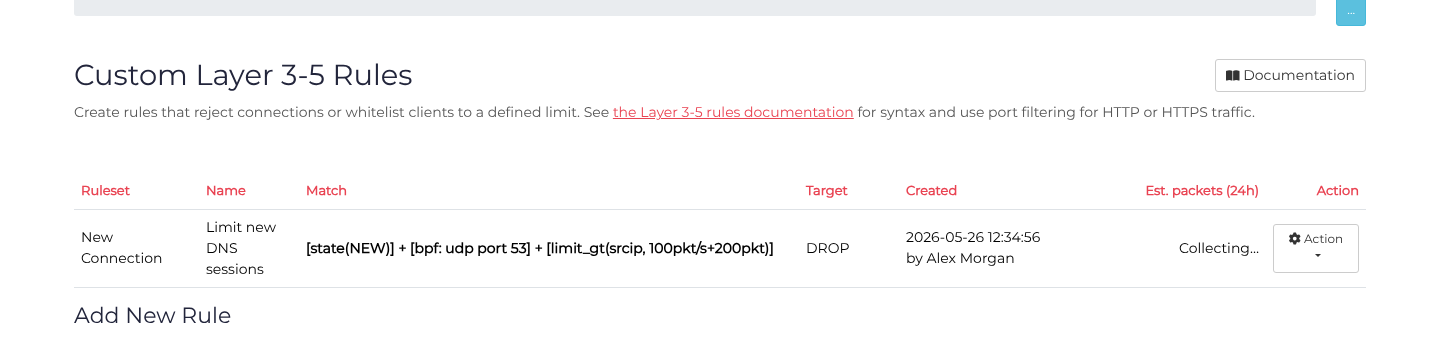
Result: New UDP sessions above the source-IP rate limit are dropped, with a burst allowance of 200. New Connection evaluates the first packet of each tracked session; this does not count every DNS query or packet in an existing session. Repeated queries in the same UDP flow do not contribute to this limit.
For a DNS packet-rate limit on an Anycast service, use All Traffic (Early) so packets in established flows are evaluated too. This hook is unavailable on Budget services. A packet-rate limit counts matching packets, not application-level DNS queries.
In the editor, enter udp port 53 in BPF Match, enable Rate Limit, retain the > comparison, and set Rate to 100, Rate unit to packet/s, Burst to 200, and Include to Source Ip. Name the rule Limit new DNS sessions, select DROP and New Connection, then save and reload.
Example 4: Filter Small UDP Packets
Goal: Drop UDP packets of at most 100 bytes (common in certain attacks)
Configuration:
- BPF Match:
udp and less 100 - Target: DROP
- Match On: All Traffic (Early)
Result: UDP packets of at most 100 bytes are dropped.
Example 5: Protect Against SYN Floods
Goal: Verify all TCP connections to prevent SYN flood attacks
Configuration:
- BPF Match:
tcp - Target: TCP VERIFY
- Match On: All Traffic (Early)
Result: All TCP connections are verified using SYN proxy, blocking spoofed sources and SYN floods.
Example 6: Block Non-Standard MSS
Goal: Drop connections with suspicious TCP MSS values (possible indication of certain attack tools)
Configuration:
- TCP: Enable
- MSS: 1 - 500 (unusually small MSS)
- Target: DROP
- Match On: New Connection
Result: TCP connections with MSS between 1-500 are dropped.
Example 7: Block other destination ports
To drop TCP and UDP traffic except traffic addressed to ports 80 and 443, use a match that excludes those ports:
- BPF Match:
(tcp or udp) and not (dst port 80 or dst port 443) - Target: DROP
- Match On: New Connection
This rule leaves ports 80 and 443 for the remaining configured protection to evaluate. It does not whitelist them. A blanket Layer 4 DROP cannot be undone by a later Layer 7 rule, because dropped packets never reach HTTP processing.
Scope: This example applies to IPv4 TCP and UDP. It excludes destination ports 80 and 443 for both protocols; a source port of 80 or 443 does not create an exception. Other IP protocols are outside this match. With New Connection, the rule checks new tracked sessions, not every packet in an already established session.
Ordering: Review the selected ruleset from top to bottom. No earlier or later DROP rule may match web traffic you intend to retain. This destination-port exclusion produces no ALLOW action for web traffic, so it cannot bypass another Layer 4 DROP. Configure the required listeners and retain the other intended protections; do not propose Layer 7 exceptions to a Layer 4 discard.
In the editor, enable BPF Match and enter the exact expression above. Leave IP List, Rate Limit and TCP matchers off for this example, name the rule Block other destination ports, select DROP and New Connection, then save and reload to verify the expression and hook.
| IPv4 packet | Matches this DROP rule? |
|---|---|
| TCP or UDP to destination port 80 or 443 | No |
| TCP or UDP to destination port 22, 53 or 8080 | Yes |
| TCP from source port 443 to destination port 8080 | Yes |
| ICMP | No |
These match results are regression-tested with constructed packet bytes and the Layer 4 BPF compiler. They describe this rule's match only; they do not assert that the excluded traffic will be accepted by every other protection or that a deployment has been traffic-tested.
Network Filtering Terminology
Understanding these terms will help you create effective filtering rules:
Layer 4 - The transport layer of the OSI network model, dealing with TCP and UDP protocols. Layer 4 operates on ports, connections, and packet headers (not content).
Layer 7 - The application layer, dealing with HTTP/HTTPS content, headers, and request details. See Layer 7 Rules for HTTP/HTTPS filtering.
TCP (Transmission Control Protocol) - A connection-oriented protocol that ensures reliable delivery of data. Used by HTTP, HTTPS, SSH, and many other services.
UDP (User Datagram Protocol) - A connectionless protocol that sends packets without guaranteed delivery. Used by DNS, gaming, VoIP, and streaming.
Source IP - The IP address of the computer sending the packet.
Destination Port - The port number the packet is being sent to on your server (e.g., 80 for HTTP, 443 for HTTPS).
Source Port - The port number on the sender's computer. Usually randomly assigned for outgoing connections.
CIDR Notation - A way to specify IP address ranges. For example, 192.168.1.0/24 represents all IPs from 192.168.1.0 to 192.168.1.255.
MSS (Maximum Segment Size) - The largest amount of data that can be sent in a single TCP segment. Typically 1460 bytes for standard Ethernet.
SYN Flood - A type of DDoS attack that exploits the TCP handshake process by sending many SYN packets without completing the connection.
Spoofed IP - A packet with a fake source IP address, often used in DDoS attacks to hide the attacker's identity.
BPF (Berkeley Packet Filter) - A technology for filtering network packets based on their characteristics. BPF expressions use a simple language to match packets.
Rate Limiting - Restricting the number of packets or bytes processed within a time period. Helps prevent abuse and resource exhaustion.
Burst - A temporary spike in traffic allowed above the sustained rate limit.
