
Getting the Real IP of a Client
An HTTP reverse proxy connects to your backend web server from the filtered IP address. Without configuration changes, your web server or application may see that address instead of the connecting client's IP.
X4B supplies an HTTP header containing the client's IP address (Real IP). Use a web-server module or an application change to read it.
How it Works
To provide this functionality a HTTP header (Layer 7) is added to requests sent to your backend web server containing the clients real IP address. This Real IP address header (defaulting to X-Real-IP), received from a trusted server (your proxy IP) is then utilized by the web server in place of the Layer 3 IP address.
Where the end user client is connecting from 123.123.123.123 a request (with this header) could look like:
GET /page HTTP/1.1
Host: www.example.com
X-Real-IP: 123.123.123.123
[...]
Alternative headers
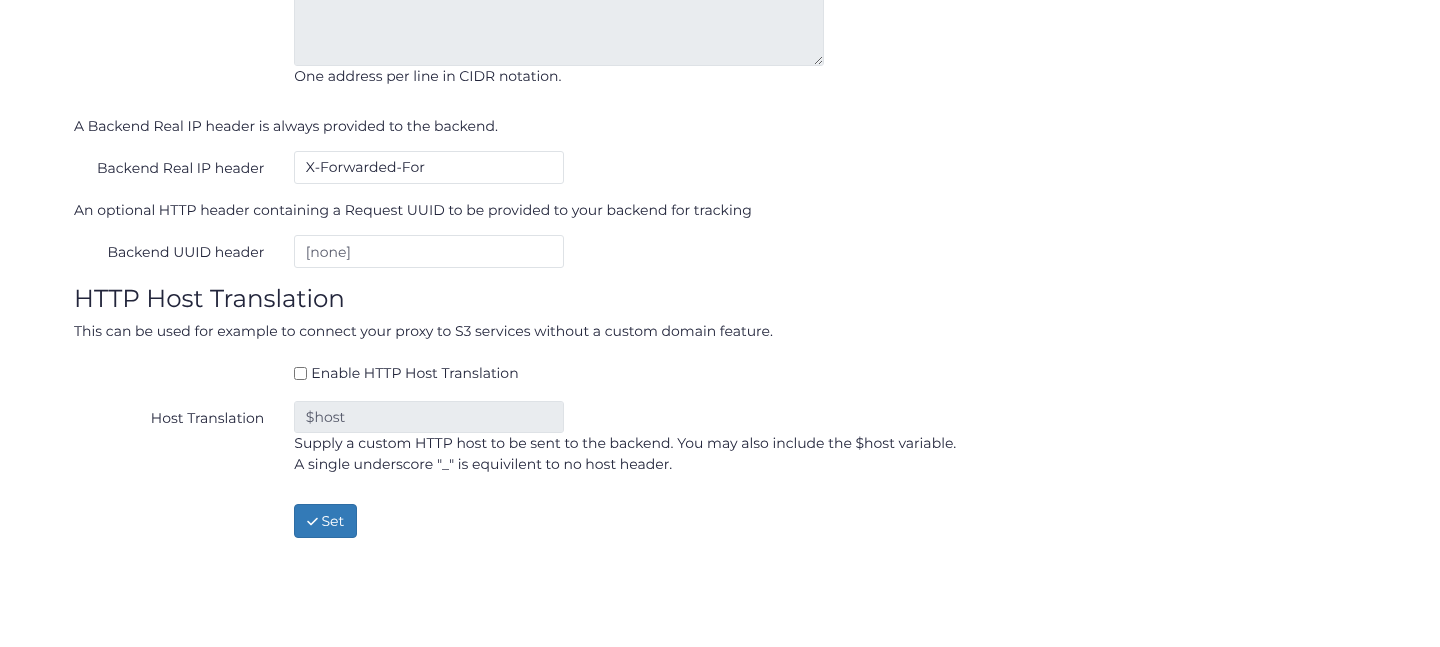
As it has a low chance of conflict we recommend the default header name (X-Real-IP). If you however need an alternative header then the header name can be changed at the port level in your dashboard. To change it, open Services, choose your service's Action > Ports, and open Action > HTTP Options on the HTTP or HTTPS port. Set Backend Real IP header to the header your trusted-proxy configuration expects, click Set, and check that the setting is retained after reloading. For example, X-Forwarded-For is an alternative header name; update the backend configuration to match before relying on it.
Installation as Server Module
Installation as a server module should be preferred. This method allows for the client IP address to be transparent to the application (not requiring any modification or compatibility) as well as for it to be used in Layer 7 access logs, rate-limits and ACLs.
Choose the guide for your web server:
Lighttpd
Installation on IIS differs depending on server version. For setup of the newest version of IIS see the following Microsoft Resource
Installation as a software modification
If it is not possible to install a server module in your environment then a software level modification is possible. This is a common restriction in shared hosting environments.
Guides by Web Programming Language:
